
The WHMCS alternative built for 2026, not 2003.
WHMCS shipped in 2003 as a server-rendered PHP billing tool for hosting providers. FluxBilling is a React 18 SPA with integrated DCIM, a visual plugin builder, and a built-in WHMCS importer. This page is the direct architectural comparison — same workflows, different stack.
- Shipped
- 2025
- Language
- JavaScript
- Stack
- React 18 SPA, PostgreSQL 16, Bun
- Plugins
- Visual plugin builder + JSON manifests
- Pricing
- Flat plans, all gateways included
- Shipped
- 2003
- Language
- PHP
- Stack
- Server-rendered PHP, MySQL
- Plugins
- Marketplace, paid modules
- Pricing
- Tiered + per-module
FluxBilling is a modern WHMCS alternative for hosting providers who want billing, DCIM, IPAM, and server provisioning in a single platform instead of WHMCS plus a stack of paid modules. WHMCS shipped in 2003 as a server-rendered PHP biller on MySQL; FluxBilling is a React 18 single-page app on PostgreSQL 16 and Bun, with rack, power, IP, and provisioning records living in the same database as invoices and clients. Integrations are visual flows built in the admin UI rather than PHP modules uploaded to the filesystem. Plans start at €4.95/mo with all payment gateways, DCIM, and the visual plugin builder included, and a built-in importer reads clients, services, products, invoices, and transactions straight from your WHMCS MySQL database. Where a specific WHMCS module has no equivalent yet, FluxBilling says so — stay on WHMCS until it ships.
Feature parity, with five architectural differences.
Both platforms cover automated billing, multi-currency, dunning, ticketing, and provisioning. The differences live in the stack and the plugin model.
| Feature | FluxBilling | WHMCS |
|---|---|---|
| Architecture | ||
| Frontend | React 18 SPA | Server-rendered PHP |
| Backend runtime | Bun + Express | PHP-FPM |
| Database | PostgreSQL 16 | MySQL |
| Tenant model | K3s pod + isolated DB per tenant | Single-tenant install |
| Billing & payments | ||
| Recurring billing | ✓ | ✓ |
| Multi-currency, FX rules | ✓ | ✓ |
| Dunning + retries | ✓ | ✓ |
| Proforma + tax invoices | ✓ | ✓ |
| All gateways included | ✓ | — per-module |
| Credit notes + refunds | ✓ | ✓ |
| Infrastructure | ||
| Integrated DCIM (rack, U-pos, power) | ✓ | — third-party |
| IPAM + VLAN management | ✓ | — third-party |
| Bare-metal automation (IPMI / Redfish) | ✓ | — module |
| VPS / hypervisor provisioning | Proxmox, Virtualizor, SolusVM 2 | cPanel + module ecosystem |
| Game servers | Pterodactyl | — module |
| Plugin model | ||
| Plugin format | Visual flows + JSON manifests (DB rows) | PHP modules (filesystem) |
| Visual flow builder | ✓ | — |
| No code-deploy required | edit + save in admin UI | upload PHP, clear cache |
| Same shape across domains | payments, hypervisors, registrars, monitoring | separate module APIs |
| Security & operations | ||
| Two-factor auth | Email-code 2FA | TOTP / email |
| Encryption at rest | AES-256-GCM (settings, credentials) | Optional |
| Tenant data isolation | Dedicated namespace + DB per tenant | — |
| Audit log | ✓ | ✓ |
| Real-time client portal | ✓ | — page reloads |
Comparison based on publicly available WHMCS documentation, captured 2026-05-11. Verify current details at whmcs.com.
Five places the platforms diverge.
Same job — bill hosting customers, provision services, run a portal. Different decade, different stack.
A platform born in 2003 vs. one designed for K3s.
WHMCS predates Kubernetes, the modern hypervisor stack, and the React era. It was built when hosting meant cPanel and shared. FluxBilling assumes you operate Proxmox, Virtualizor, IPMI bare metal, and that your customer expects a portal that does not reload.
PHP module ecosystem vs. visual plugin builder.
WHMCS plugins are PHP modules with separate APIs per domain — gateway, server, registrar, addon. FluxBilling integrations are visual flows stored as JSON in the database, composed in a drag-and-drop builder, with the same lifecycle hooks across payments, infrastructure, registrars, and notifications. Editing and saving a plugin in the admin UI is the deploy — no filesystem upload, no PHP cache clear.
Billing-only vs. billing + DCIM in one schema.
Rack management, IPAM, VLANs, power monitoring, and asset tracking are first-class tables in the FluxBilling database — joined directly to services, invoices, and clients. WHMCS treats DCIM as third-party. The result: when you sell U2 in rack B-04, the invoice, the device, and the IP allocation are linked records, not external sync targets.
Per-module pricing vs. flat plan with everything included.
WHMCS licenses the platform, and most production deployments add paid modules from ModulesGarden or the WHMCS Marketplace on top — DCIM connectors, provisioning targets, niche gateways, region-specific tax engines. FluxBilling plans start at €4.95/mo and include all payment gateways, DCIM, and the visual plugin builder. The unit economics are predictable and you do not stack invoices from multiple vendors.
Page reloads vs. native-app interface.
The WHMCS admin and client portal are server-rendered HTML — every action is a round-trip and a full re-render. FluxBilling is a React SPA backed by queued workers: optimistic UI, real-time state, no full-page reloads between actions. The same actions take the same number of clicks; what changes is how it feels.
What the licence buys, at 2026 prices.
WHMCS raised list prices on January 1, 2026 — the second increase in two years. The licence is only the start of the bill: DCIM, many provisioning targets, and priority support are separate line items. FluxBilling ships every tier with DCIM, IPAM, provisioning, all payment gateways, and support included — one vendor, one invoice.
| Plus | $34.95/mo | 250 clients |
|---|---|---|
| Professional | $54.95/mo | 500 clients |
| Business 1,000 | $84.95/mo | 1,000 clients |
Still paid separately on a production WHMCS stack:
- DCIM / rack / power: Not in WHMCS — a separate EasyDCIM licence or third-party stack
- Provisioning modules: Core set included; many production targets are paid marketplace or ModulesGarden modules
- Priority support: Per-ticket fee on Business tiers
€4.95/mo (Lite, 10 clients) to €44.95/mo (Business, unlimited clients). Every tier — including Lite — ships with integrated DCIM, IPAM, bare-metal and VPS provisioning, every payment gateway, the visual plugin builder, and support. There are no per-module licences and no per-ticket support fees on any tier.
Category note, stated plainly: WHMCS licences are software you self-host; FluxBilling tiers are managed SaaS. Self-hosting FluxBilling requires the Business tier plus a one-time €500 self-host fee — if you want cheap self-hosting or a perpetual licence, WHMCS, Blesta, or ClientExec fit better. Where FluxBilling wins on cost is the stack, not the sticker: unlimited clients at €44.95/mo, with the DCIM and provisioning layer that WHMCS prices as separate products.
WHMCS self-hosted list prices, re-captured from whmcs.com/pricing on 2026-08-12 after the January 1, 2026 adjustment. The self-hosted ladder stops at 1,000 clients. Verify current figures at whmcs.com/pricing.
The WHMCS Import plugin ships with the platform.
Open the admin panel, point the import at your WHMCS MySQL database — direct or over an SSH tunnel — preview, then run. The plugin reads from WHMCS, it does not write back. ID mappings are stored, so re-runs only pick up new or changed records. WHMCS Import ships on every tier — Lite, Starter, Professional, and Business — not as a paid add-on, and migration support is included.
- 01.Connect.Enter the WHMCS MySQL host and credentials — direct, or via an SSH tunnel if the DB is not exposed. Optional
cc_encryption_hashfor credit-card data. - 02.Preview.Review the entity counts — clients, services, products, invoices, transactions — before any write.
- 03.Import.Streams records in batches with progress, error log, and rollback. Wall-clock duration depends on install size and network throughput.
- 04.Verify + cutover.Run WHMCS read-only alongside FluxBilling. Validate, then switch DNS for the portal.
- Clients
- Contact details, addresses, currency, status, password hashes (re-hashed on first login)
- Services
- Active + suspended, billing cycle, next due date, custom fields, module → plugin mapping
- Products
- Pricing tiers, billing cycles, setup fees, module config
- Invoices
- Open + paid, line items, taxes, due dates, status
- Transactions
- Payment records, refunds, gateway, transaction IDs
- Departments
- Ticket departments, mapped to FluxBilling departments
- Tickets
- Migrated separately — historical archive optional
- Custom modules
- Custom PHP modules need to be rebuilt as visual plugins (assisted)
- Email templates
- Re-create in FluxBilling using the Handlebars editor
- Cron history
- Job history is platform-specific and not carried over
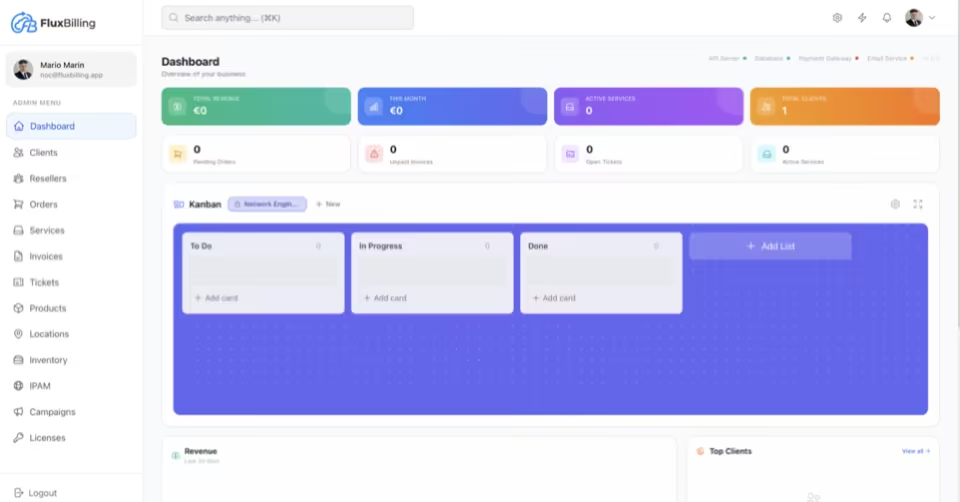
Same data. Different runtime.
Clients, services, invoices — now rendered as a React SPA, joined to integrated DCIM, and connected to the visual plugin builder.
Migration questions, answered straight.
01.Will the WHMCS Import plugin migrate my entire WHMCS install?
It migrates clients, services, products, invoices, transactions, and departments by reading directly from the WHMCS MySQL database (optionally over an SSH tunnel) — it does not use the WHMCS API and does not require a SQL dump file. Tickets, custom PHP modules, and email templates are handled separately. ID mappings are stored, so re-runs only pick up new or changed records.
02.Does FluxBilling have an equivalent for every WHMCS module?
For the major hosting workflows — yes. Proxmox, Virtualizor, SolusVM 2, Pterodactyl, IPMI / Redfish bare metal, Stripe, PayPal, CoinGate, Mollie. Niche WHMCS modules (region-specific tax engines, exotic provisioning targets) may need to be rebuilt as a visual plugin; the FluxBilling team assists with that during migration. On the Business tier, custom migration of legacy or in-house platforms is included free of charge.
03.How is FluxBilling priced compared to WHMCS?
FluxBilling plans run €4.95/mo (Lite, 10 clients) to €44.95/mo (Business, unlimited clients), flat, with all payment gateways, integrated DCIM, IPAM, provisioning, and support included on every tier. WHMCS self-hosted licences are client-count capped and stop at 1,000 clients: Plus $34.95/mo for 250, Professional $54.95/mo for 500, Business $84.95/mo for 1,000 (whmcs.com/pricing, checked 2026-08-12) — and DCIM, many provisioning modules, and priority support are paid separately. Note the category difference: WHMCS is self-hosted software; FluxBilling tiers are managed SaaS, and self-hosting FluxBilling requires Business plus a one-time €500 fee.
04.Can I run WHMCS and FluxBilling side-by-side during migration?
Yes. The WHMCS Import is read-only against the WHMCS database — it does not write back. You can run a parallel cutover: import data, validate, switch DNS for the client portal, then deprecate WHMCS. The FluxBilling team supports the cutover.
05.What happens to client passwords during migration?
WHMCS password hashes are imported and re-hashed automatically on first login under FluxBilling. Customers do not need to reset their password manually unless they want to.
06.Does FluxBilling support cPanel, Plesk, or DirectAdmin?
cPanel / WHM ships as a visual plugin today, covering shared hosting accounts and reseller packages. Plesk and DirectAdmin are on the roadmap. The rest of the provisioning set is VPS, dedicated server, game server, and infrastructure-as-a-service — Proxmox VE, Virtualizor, SolusVM 2, Pterodactyl, IPMI / Redfish bare metal.
The best WHMCS alternative, by case.
There is no single best WHMCS alternative — the shortlist is decided by what you are replacing. Six scenarios, and the honest pick for each.
Racks, IP allocations, and the invoice line that bills them are the same records. Every other route on this list pairs a biller with a separate DCIM tool and a sync module between them.
A region-specific tax engine or an exotic gateway with no visual-plugin equivalent is a real blocker. Migrate when the equivalent ships, not before.
EasyDCIM positions around vendor-deep BMC integration. FluxBilling covers IPMI and Redfish to a level that suits most hosting providers, but not every firmware feature.
Both sell perpetual or lifetime licences. FluxBilling is subscription on every tier; the Business tier adds a one-time self-host fee on top, which is not the same thing.
FluxBilling is proprietary and the source is not published. Teams with a hard open-source requirement for DCIM or IPAM should evaluate NetBox or openDCIM instead.
React 18 SPA on PostgreSQL and Bun, integrations authored as visual flows rather than PHP modules, and an importer that reads clients, services, products, invoices, and transactions straight out of the WHMCS MySQL database.
Your business depends on a specific WHMCS module — a niche provisioning integration, a region-specific tax engine, an exotic gateway — that has no equivalent visual plugin yet.
The visual plugin builder can replicate most of those modules, but if you need it running tomorrow, stay on WHMCS until the equivalent ships. We will not pretend otherwise.
Before you switch: the long reads
The comparisons and checklists behind the ranking above, from the FluxBilling blog.
- FluxBilling: a modern alternative to WHMCS and EasyDCIM
- Hosting billing software pricing 2026: every published price
- Client limits in hosting billing software: how vendors count
- Migrating billing platforms: a vendor-neutral checklist
- Upmind vs WHMCS 2026: what “free” actually means
- DCIM software for hosting and colocationThe category guide: what DCIM does, how to evaluate it, which vendors fit which case, and what it costs.
Send us your WHMCS install size. We scope the cutover.
Open a ticket with your client count, service count, and the modules you depend on. The team responds within one business day with a migration plan and any visual-plugin work required.
WHMCS is a registered trademark of WHMCS Limited. This page is not affiliated with, endorsed by, or sponsored by WHMCS Limited. Comparison data is based on publicly available documentation and pricing as of May 2026 and may not reflect the most current state. Verify all details with the respective vendors before purchasing.