
v2 Expressions and the Expressions Tester
Switch a flow to v2 (JavaScript) expressions, learn what changes from Classic, and try templates and scripts in the Expressions tab.
Every flow in a plugin evaluates its {{ }} placeholders with one of two expression languages: Classic or v2 (JavaScript). v2 follows ordinary JavaScript rules. You get ??, !, reduce, .length on any result, arrow functions with full bodies, dates, time zones and hashing helpers, and a clear error message when something is wrong. You choose the language per flow in the flow builder. The Expressions tab next to it lets you try any template, expression or Code node script against sample data before you save.
This article is for plugin authors. It covers how to switch a flow to v2, what changes when you do, everything the language can read and call, the limits, and the error messages you may see. The Classic rules are described in Variables & Expressions. For the flow builder itself see Building Flows.
Where to find it
Open Settings from the top header, then Integrations → Plugins. Open your plugin, choose the Flows tab and click a flow card to open it in the builder. No feature toggle is needed. Analytics plugins have no Flows tab, so they have no expressions to switch.
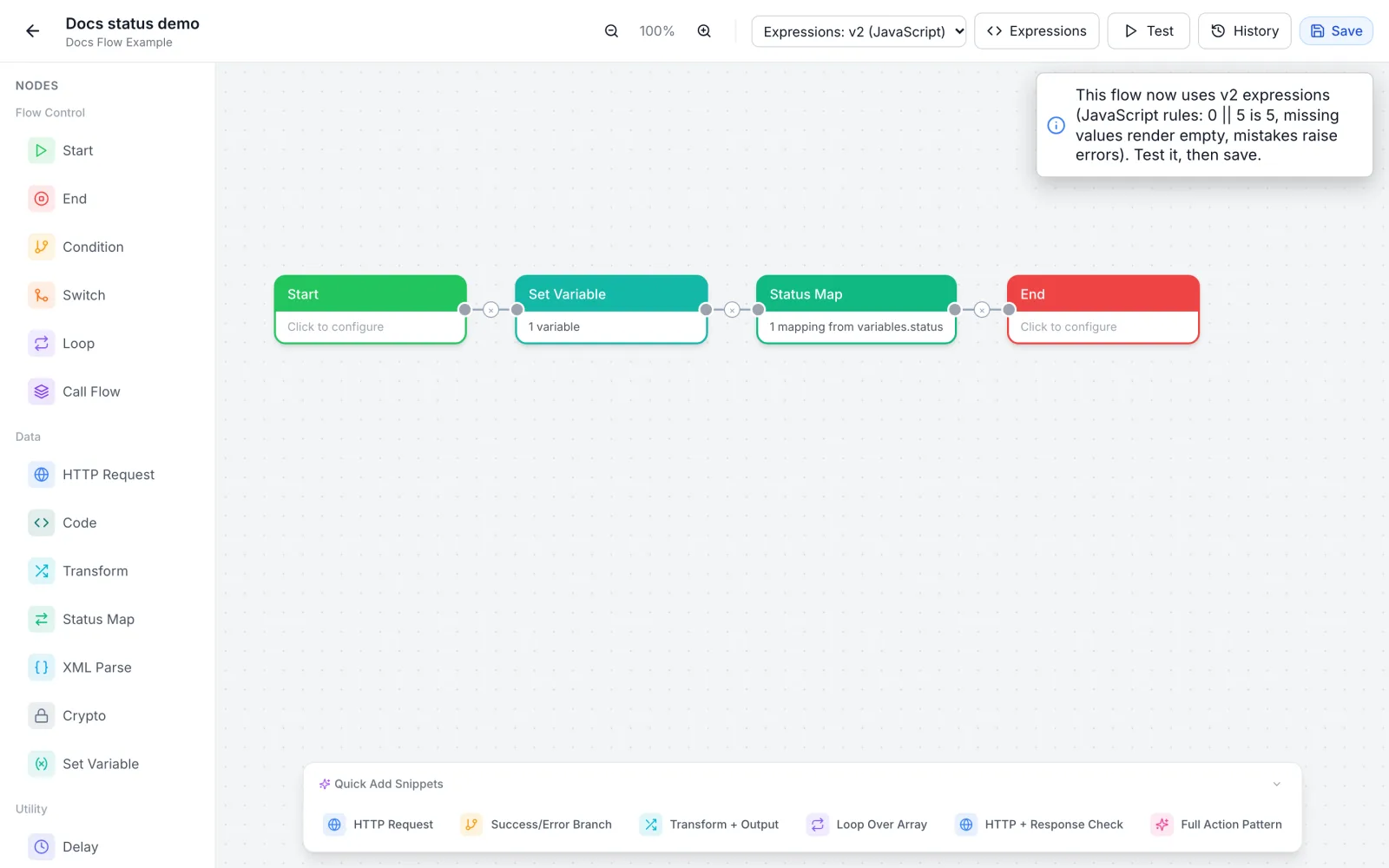
The builder toolbar, to the right of the zoom controls, holds the two controls this article is about:
- A select showing Expressions: Classic or Expressions: v2 (JavaScript). Its tooltip reads "Expression language for every placeholder field in this flow".
- The Expressions button, which opens the tester in the right-hand pane beside Test and History.
Switch a flow to v2
- Open the flow in the builder.
- Check your existing expressions first. Open the Expressions tab, set Engine to v2 (JavaScript) and try each placeholder of the flow against sample data. Some expressions give a different result under v2 (see the next section). The tester needs no save.
- In the toolbar select, choose Expressions: v2 (JavaScript). A notice confirms the switch and sums up the JavaScript rules:
0 || 5is 5, missing values render empty, mistakes raise errors. - Click Save. The choice is stored with the flow and takes effect from the next run.
- Click Test and run the flow with test input. Test runs the saved flow, so it now uses v2. Check every node in the trace.
To go back, choose Expressions: Classic and click Save. Until you save, the flow keeps running, and testing, with the language it was saved with.
The setting belongs to one flow. Other flows of the same plugin keep their own setting, so you can move a plugin over one flow at a time. A flow you create in the builder, blank or from a template, starts on Classic. A plugin package you import keeps the setting each of its flows was exported with.
The Code node always uses v2. A Code node runs its script with the v2 language even in a Classic flow. See Code Node and Sub-flows.
What changes when you switch
The same placeholder can give a different result under each language. These results come from the two engines with the same sample data:
| Expression | Classic | v2 (JavaScript) |
|---|---|---|
{{ 0 || 5 }} | 0 | 5 |
{{ input.qty ?? 1 }} with qty = 0 | not resolved, the text stays as written | 0 |
{{ "100" + 5 }} | 105 | "1005" |
{{ !input.on }} with on = false | 1 | true |
Hi {{ input.missing }}! | Hi {{ input.missing }}! | Hi ! |
{{ input.items.filter(i => i.on).length }} | not resolved | the count |
{{ input.items.reduce((a, b) => a + b, 0) }} | not resolved | the sum |
{{ input.tags.includes("pri") }} with tags ["priority"] | true (text match) | false (element match) |
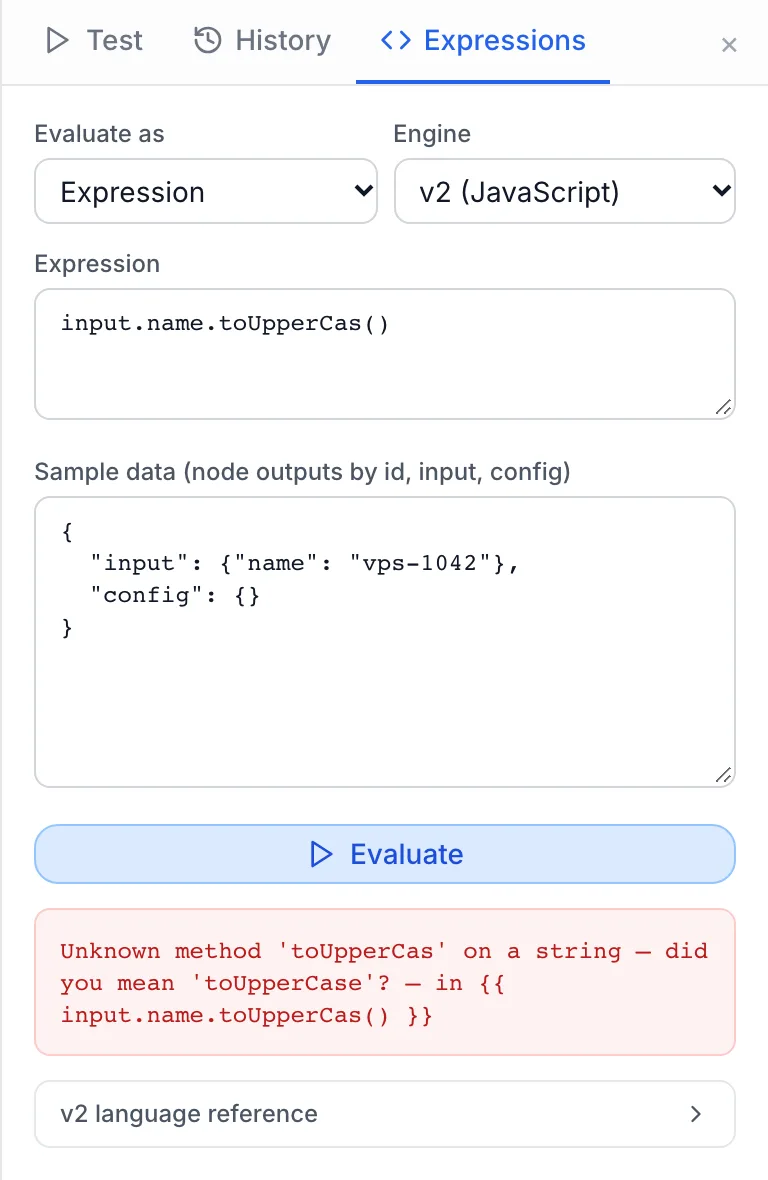
{{ input.name.toUpperCas() }} (typo) | not resolved, no error | error: Unknown method 'toUpperCas' on a string — did you mean 'toUpperCase'? |
{{ 1 + }} | 1 | error: Unexpected end of expression |
{{ input.status }} in a Condition field | {} | the value of status |
In short: v2 behaves like JavaScript, an empty value inside text becomes empty text instead of leaving the placeholder behind, and a mistake stops the node with a message instead of quietly producing nothing. Before you switch an existing flow, look for fallbacks with || on values that can be 0 or false, and for + on numbers that arrive as text. Write Number(x) + 5 when you mean addition.
Templates, expressions and paths
A flow field holds one of three kinds of value:
- Template: text with
{{ }}placeholders, such as an HTTP path, header or body, an End node output or a Set Variable value.Invoice {{ invoiceId }} for {{ user.email }}. - Bare expression: a field that is an expression without braces, such as the field of a Condition, Switch or Status Map node, or a Transform mapping's Expression (optional) field.
http-get.data.status. Under v2 these fields also accept the expression wrapped in{{ }}. Under Classic they do not. - Script: the code of a Code node, where statements such as
const,ifandreturnare allowed.
Under v2, templates follow these rules:
| Template | Result |
|---|---|
{{ amount }}, alone in the field | The value with its type: number, boolean, object, array or null. |
{{ amount }} EUR, anything around it, even a space | Text. Objects and arrays become JSON text. |
| A missing value inside text | Empty text. |
| A missing value as the whole field | No value. In an object such as an HTTP body, the key is left out. |
\{{ literal }} | The literal text {{ literal }}. |
{{ with no closing }} | Sent as literal text. |
A placeholder ends at the first }} outside the expression's own strings, object literals and regular expressions, so {{ {a: {b: 1}} }} works as written. Rendering happens once: if a value itself contains {{ }}, for example text a customer typed, it is not evaluated.
What an expression can read
| Name | What it is |
|---|---|
input | The output of the node the current node is connected from. Right after Start, that is the flow input. |
| flow input fields | Each top-level field of the flow input, by its name, for example serviceId. |
| node ids | The output of any node that has already run: http-get.data.id. Also reachable as nodes['http-get'] and, with underscores, http_get. |
config | The plugin's settings, for example config.api_url. |
variables | The flow data collected so far, including values stored with a Set Variable node. |
item, index | Inside a Loop body, the current item and its position, or the names set on the Loop node. |
$flow | Details of the run: pluginId, executionId, nodeId, flowId, flowSlug, flowType. |
$ | The helper functions listed below. |
A node id with hyphens works at the start of an expression: http-get.data reads the node, as long as there is no space around the hyphen. Where no node has that name, the hyphen is a minus sign, so total-tax subtracts. Keys with hyphens deeper in the data need brackets: http-get.data['created-at'].
A name that does not exist gives undefined and adds the warning Unknown name 'foo' (resolved to undefined) to the run trace. Reading a property of a missing value also gives undefined instead of an error, so input.server.ip is safe when server is absent. The same goes for calling a method on a missing value.
Syntax
v2 accepts JavaScript expressions:
- Literals: numbers,
'text',"text", template literals`id-${input.n}`,true,false,null,undefined, arrays, objects with spread and computed keys, and regular expressions such as/^a/i. - Operators:
+ - * / % **,== != === !==,< > <= >=,&& || ??,!,typeof,in,? :, optional chaininga?.b,a?.[0],f?.(), and spread.... - Arrow functions and function expressions, with destructuring, default and rest parameters. A body in braces may hold statements, so
{{ (() => { const x = 2; return x * 3 })() }}works. new Date(),new Map(),new Set()andnew RegExp().
Not available: statements directly inside {{ }} (use a Code node or the function form above), the comma operator, bitwise operators, instanceof, delete, this, arguments, classes, generators, async/await, labels and getters or setters. Each of these stops with a message that says so, for example 'delete' is not supported — build a new object without the key (e.g. $.omit(obj, 'key')).
An expression cannot reach anything outside the flow's own data: there is no network, file or process access.
Flow data is read-only
Values that came from the flow, which are input, config and node outputs, cannot be changed in place. input.tags.sort() stops with Cannot sort data that came from the flow (input, config or a node output) — make a copy first, e.g. {...obj} or [...arr]. Work on a copy instead:
{{ [...input.tags].sort() }}
{{ input.tags.toSorted() }}
{{ { ...input.server, status: "active" } }}
{{ $.omit(input, "password") }}
Built-in objects, methods and helpers
The v2 language reference at the bottom of the Expressions tab lists the $ helpers, Array methods, String methods, Date methods and Globals available on your panel. Number methods are not in that list; they are covered below. The main groups:
- Globals:
Math(all functions and constants),JSON,Object,Array,Number,String,Boolean,Date,Map,Set,RegExp,Error,parseInt,parseFloat,isNaN,isFinite,encodeURIComponent,decodeURIComponent,encodeURI,decodeURI,btoa,atobandconsole. - Array methods: the standard ones (
map,filter,find,findIndex,some,every,reduce,includes,join,slice,flat,flatMap,at,toSortedand more) plusfirst(),last(),isEmpty(),compact(),pluck(path),sum(),avg(),min(),max(),minBy(),maxBy(),unique(),groupBy(),countBy(),keyBy(),sortBy(fn, 'asc' or 'desc'),chunk(n),partition()andcount(). Where these take a function you can pass a property path instead:items.sum('price'). - String methods: the standard ones plus
isEmpty(),toNumber(default),toInt(default),toDate(),parseJson(default),slugify(),capitalize(),truncate(n, suffix),urlEncode(),urlDecode()andhash(algorithm, encoding). - Number methods:
toFixed,toPrecision,toString(radix),toLocaleString,round(digits),floor(),ceil(),abs()andclamp(lo, hi). - Date methods: the standard getters and
toISOString()plusformat(pattern, timeZone),add(n, unit),subtract(n, unit),diff(other, unit),startOf(unit),isValid()andunix().
Methods belong to the type of the value. A number that arrives as text has no number methods, so "5".toFixed(2) stops with Unknown method 'toFixed' on a string. Convert first: Number(input.price).toFixed(2). The same goes for dates that arrive as text: $.date(input.created).format('YYYY-MM-DD').
The $ helpers
| Helpers | What they do |
|---|---|
$.now(), $.timestamp(), $.unix(date), $.fromUnix(seconds) | The current date, epoch milliseconds, epoch seconds, and a date from epoch seconds. |
$.today(timeZone), $.date(value), $.formatDate(date, pattern, timeZone) | Today as YYYY-MM-DD, a date from text or a number (or null), and formatted text. Without a pattern, $.formatDate writes YYYY-MM-DDTHH:mm:ssZ in UTC. |
$.addDays, $.addHours, $.addMinutes, $.addMonths, $.addYears (date, n), $.diff(a, b, unit), $.startOf(date, unit) | Date arithmetic. $.diff counts whole units, days unless you name another unit. |
$.get(obj, 'a.b[0]', default), $.has(obj, path) | Safe deep reads. |
$.pick(obj, ...keys), $.omit(obj, ...keys), $.merge(...objs), $.clone(v), $.keys, $.values, $.entries | Build new objects. |
$.isEmpty(v), $.isNil(v), $.typeOf(v), $.coalesce(...values), $.ifEmpty(v, default) | Checks and fallbacks. $.coalesce returns the first value that is not null, undefined or empty text. |
$.toNumber(v, default), $.toInt(v, default), $.toBoolean(v) | Conversions. $.toBoolean treats the text true, 1, yes, on and y as true. |
$.round(n, digits), $.clamp(n, lo, hi), $.sum, $.avg, $.min, $.max, $.range(start, end, step) | Numbers. |
$.formatNumber(n, locale, options), $.formatCurrency(n, currency, locale) | Formatted numbers and amounts, for example $.formatCurrency(12.5, 'EUR', 'de-DE') gives 12,50 €. |
$.uuid(), $.randomInt(lo, hi), $.randomString(length, alphabet) | Random values for ids and references. Do not use them to create passwords or keys. |
$.hash(algorithm, data, encoding), $.hmac(algorithm, key, data, encoding), $.md5, $.sha1, $.sha256, $.sha512 | Digests and signatures. Algorithms: md5, sha1, sha224, sha256, sha384, sha512, sha3-256, sha3-384, sha3-512. Encodings: hex, base64, base64url, latin1. |
$.base64Encode, $.base64Decode, $.base64UrlEncode, $.base64UrlDecode, $.hexEncode, $.hexDecode, $.urlEncode, $.urlDecode | Encodings. Unlike btoa, which accepts Latin-1 text only, $.base64Encode takes any text. |
$.toQuery(obj), $.parseQuery(text), $.parseUrl(text) | Build and read query strings and URLs. |
$.jsonParse(text, default), $.jsonStringify(v, pretty) | JSON. $.jsonParse never stops the node: invalid text gives the default, or null. |
$.slugify, $.escapeHtml, $.isIPv4, $.isIPv6, $.isEmail | Text and address checks. |
Dates and time zones
Format patterns use these tokens: YYYY YY MMMM MMM MM M DD D dddd ddd d HH H hh h mm m ss s SSS A a ZZ Z X x. Put literal text in square brackets, for example [at] HH:mm. A time zone is an IANA name such as Europe/Bucharest, and formatting is in UTC when you give none. An unknown zone stops with Unknown time zone 'Europe/Nowhere'.
Units for add, subtract, diff and the $ date helpers: year, month, week, day, hour, minute, second, millisecond, singular or plural, and the short forms y, d, h, min, sec and ms. startOf accepts year, month, week (weeks start on Monday), day, hour and minute. Adding months keeps the end of the month: 31 January plus one month is 28 February, or 29 February in a leap year.
{{ $.formatDate("2026-11-11T10:00:00Z", "DD MMM YYYY HH:mm", "Europe/Bucharest") }}   → 11 Nov 2026 12:00
{{ $.date("2026-01-31").add(1, "month").format("YYYY-MM-DD") }}                      → 2026-02-28
{{ $.addDays($.now(), 30).toISOString() }}                                          in 30 days, ISO format
Examples
| Task | Expression |
|---|---|
| Fallback when empty | {{ config.region || 'eu' }} |
Fallback that keeps 0 | {{ input.count ?? 1 }} |
| Amount to cents | {{ Math.round(amount * 100) }} |
| Two decimals as text | {{ Number(amount).toFixed(2) }} |
| Basic auth header | {{ 'Basic ' + $.base64Encode(config.username + ':' + config.password) }} |
| HMAC signature | {{ $.hmac('sha256', config.secret, JSON.stringify(payload), 'hex') }} |
| Find by key | {{ http-get.data.links.find(l => l.rel === 'approve')?.href }} |
| Count matches | {{ http-list.data.servers.filter(s => s.online).length }} |
| Sum of a field | {{ items.sum(i => i.price * i.qty) }} |
| List to options | {{ http-list.data.plans.map(p => ({ id: p.id, name: p.name })) }} |
| Map a status | {{ ({ active: 'running', off: 'stopped' })[http-get.data.state] ?? 'unknown' }} |
| Safe deep read | {{ http-get.data?.server?.ip ?? null }} |
| Pad an id | {{ String(id).padStart(6, '0') }} |
| Setting by computed name | {{ config['msg_' + eventKey] }} |
| Largest value in a list | {{ Math.max(...list) }} or {{ list.max() }} |
One JavaScript habit to watch: 'x' + undefined is the text xundefined. Write 'x' + (y ?? '') when a value may be missing.
Try expressions in the Expressions tab
Click Expressions in the builder toolbar, or the Expressions tab in the right-hand pane. The tester evaluates what you type with the same engine a flow uses. It does not run any node, does not call any provider and stores nothing.
| Field | What it does |
|---|---|
| Evaluate as | Template (text with placeholders) for fields such as an HTTP body or path, Expression for bare-expression fields such as a Condition field, or Code node script for a Code node. |
| Engine | v2 (JavaScript) or Classic. It starts on the flow's own setting, and you can change it to compare. For a Code node script it is fixed to v2. |
| Expression / Script | What to evaluate. Write a template with its braces, an expression without them, or a script with statements and a return. |
| Sample data (node outputs by id, input, config) | A JSON object with the data the expression reads. After you run Test, it is filled with the test input and the output of every node that completed, by node id. config starts empty: add the settings your expression reads. |
| Evaluate | Runs it. The button is disabled while the expression is empty. |
Under the button you see the Result with its type (for example string, number, array or undefined), or the error in red. Warnings, such as an unknown name, appear in an amber box. For a script, anything written with console.log appears under console.
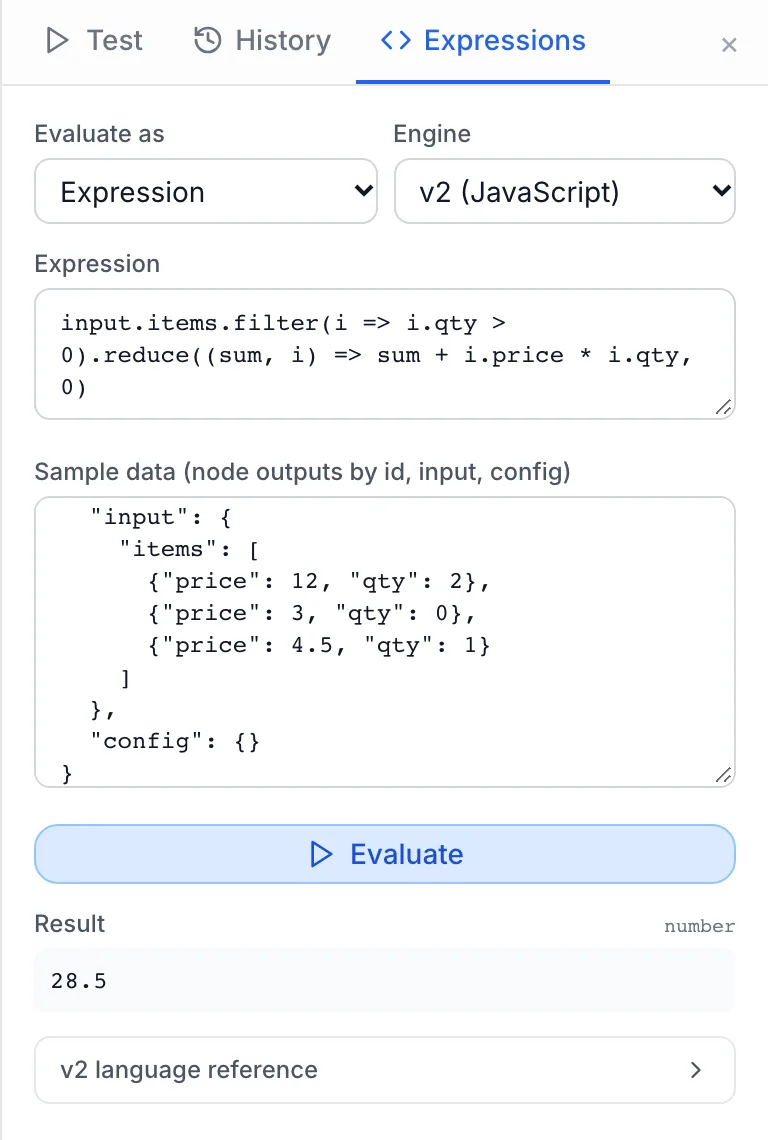
Open v2 language reference at the bottom of the tab for the full list of $ helpers, Array methods, String methods, Date methods and Globals.
A quick way to work: run Test once with realistic input, open the Expressions tab, and try each placeholder against the real node outputs. Switch Engine between Classic and v2 (JavaScript) to see whether an existing expression gives the same result before you switch the flow.
Limits
| Limit | Value |
|---|---|
| Steps per evaluation | 1,000,000 |
| Time per evaluation | 1 second |
| Nested function calls | 128 |
| Length of a text value | 5,000,000 characters |
| Items in an array, map or set | 1,000,000 |
| Regular expression pattern | 500 characters. Patterns with nested quantifiers, such as (a+)+, are refused. |
| Code node script | 5,000,000 steps, and the node's Time budget (ms) of 10 to 5,000 ms. |
| Expressions tab | Expressions up to 100,000 characters, sample data up to 1 MB. Scripts get 2 seconds. |
A script's own try/catch cannot catch a limit error.
When an expression fails in a run
Under v2, a syntax error, an unknown method, calling something that is not a function, changing flow data or reaching a limit fails the node. The message names the expression, for example Unknown method 'toFixed' on a string — in {{ input.price.toFixed(2) }}. What happens next follows the node's Error handling & retry setting: stop the flow, continue on the normal path, or take the error output. See Node Error Handling and Retry. An unknown name does not fail the node: it gives undefined and a warning in the trace.
When you import a plugin package, the Check package step also checks expressions, and lists each problem under errors. In v2 flows, an expression or template that does not parse shows as Expression error: … or Template error: …. In any flow, a Code node script that does not parse shows as Script error: …, an empty placeholder as Empty {{ }} placeholder., and a {{ that is never closed as "{{" without a closing "}}" — the text is sent literally. See Packaging, Importing & Updating.
Troubleshooting
| Message | Cause and fix |
|---|---|
Unknown name 'x' (resolved to undefined) | A warning, not an error. The name is not a node id, flow input field or global. Check the node id, and that the node has run before this one. |
Unknown method 'x' on a string (sometimes with did you mean) | The method does not exist for that type, or the value has a different type than you expect. Convert with Number(), String() or $.date(). |
'x' is not a function | You called a value that is not a function. |
Cannot sort data that came from the flow … / Cannot modify data that came from the flow … | You changed input, config or a node output in place. Copy it first with [...arr] or {...obj}, or use toSorted(). |
Unexpected end of expression | The expression is incomplete, for example a missing operand or bracket. |
Empty expression | A {{ }} with nothing inside. Remove it. |
The comma operator is not supported — split the expression or use an array | Two expressions separated by a comma. Use an array, or two fields. |
Operator '|' is not supported | Bitwise operators are not available. If you meant OR, write ||. |
Unexpected keyword 'let' | Statements are not allowed directly in {{ }}. Use a Code node or (() => { … })(). |
btoa: string contains characters outside Latin-1 | Use $.base64Encode(text). |
parseJson: invalid JSON | The text is not JSON. Give a default, text.parseJson({}), or use $.jsonParse(text, {}). |
Expression exceeded its step budget (1000000 steps) … / Expression exceeded its time budget (1000 ms) | A loop that does not end, or too much work in one expression. Simplify it, or move the work to a Loop node or fewer, larger API calls. |
Array too large … / String result too large … | The result is over the limits in the table above. |
Regex pattern rejected: nested quantifiers may cause ReDoS | Rewrite the pattern without a repeated group that itself repeats. |
Sample data must be a JSON object | Shown in the Expressions tab only: the sample data is not valid JSON, or it is an array. Wrap it in { }. |
If a value comes out wrong rather than failing, run Test, open the node in the trace and read the real shape of its output. A path that is one level off, such as http-get.id instead of http-get.data.id, is the most common cause.
Related: Variables & Expressions · Building Flows · Node Reference · Code Node and Sub-flows · Node Error Handling and Retry