
Product Client Controls: Console, Power, Reinstall, Password Reset and Images
Per-product switches that decide whether customers can open the console, use power buttons, reinstall, reset the root password or capture images.
Client controls are per-product switches that decide what a customer may do with a server from their own panel: open the console, use the power buttons, reinstall the operating system, reset the root password and capture server images. Use them to sell the same hardware or VPS plan as a self-managed product with every control, and as a managed product where your team keeps the risky actions to itself.
The switches only limit the customer. Your staff keep every action in the admin panel, whatever the product says.
Where to find it
- In the admin panel, click Products in the sidebar.
- Click Edit on a product, or Add Product to create one.
- On the General tab, find the Client controls card under the product's identity fields. Its subtitle reads What the customer can do with this service from their panel.
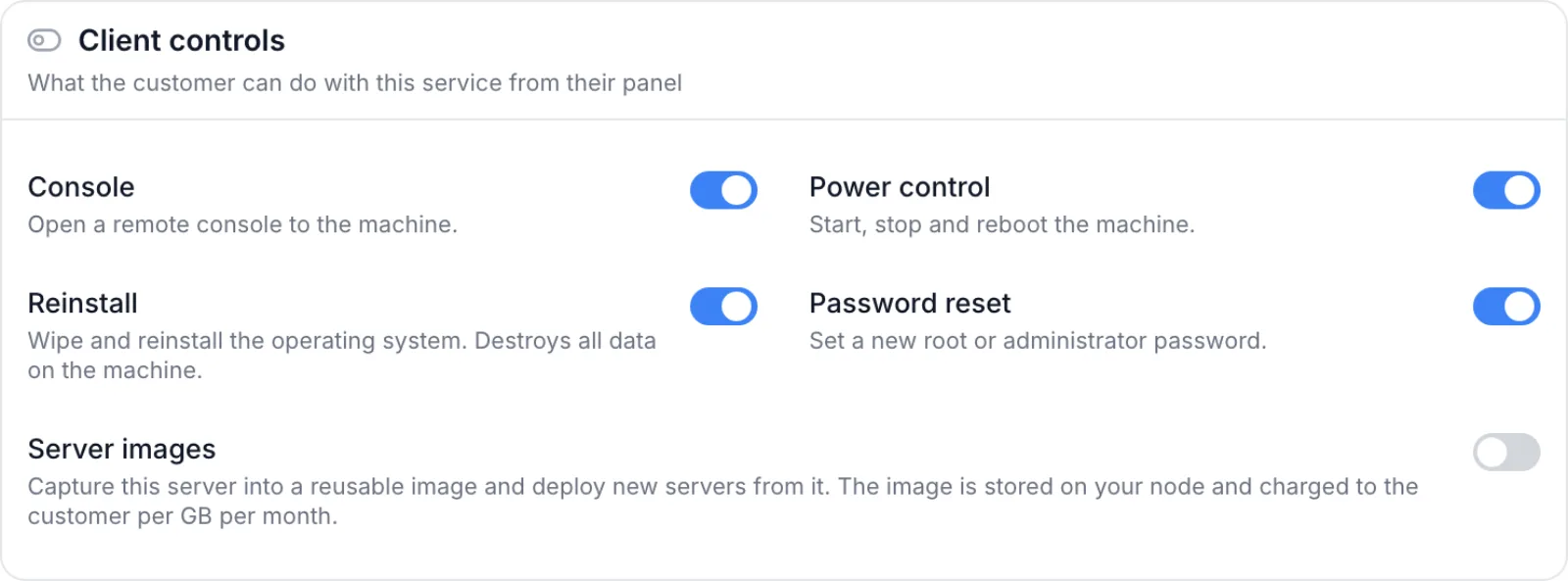
The card has no feature toggle of its own. It appears only for products whose services actually read these switches, and it shows only the switches that apply:
| Product kind | Switches shown |
|---|---|
| Native VPS (needs the VPS module on) | Console, Power control, Reinstall, Password reset, Server images |
| Dedicated server | Console, Power control, Reinstall, Password reset |
| Provisioned by a plugin that can open a console | Console only |
| Provisioned by a plugin without a console | No card |
| Game server, web hosting, other, colocation, IP transit, licence | No card |
The switches
A switch that is on allows the action. Switch it off to take the action away from the customer.
| Switch | Description in the card | What switching it off does |
|---|---|---|
| Console | Open a remote console to the machine. | The customer cannot open the console from the service page, and a console share link cannot be created for the service. |
| Power control | Start, stop and reboot the machine. | All power buttons disappear for the customer. On a VPS this overrides the power actions you allow under VPS → Settings. |
| Reinstall | Wipe and reinstall the operating system. Destroys all data on the machine. | The customer cannot reinstall the operating system. |
| Password reset | Set a new root or administrator password. | The customer cannot reset the root password. |
| Server images (native VPS only) | Capture this server into a reusable image and deploy new servers from it. The image is stored on your node and charged to the customer per GB per month. | The customer cannot capture a VPS of this product as an image. |
Change the controls of a product
- Open the product as described above.
- On the General tab, click a row in Client controls to switch it on or off.
- Save the product.
The change applies straight away to every existing service of the product, not only to new orders. A customer who has the service page open sees the change the next time the page loads its data, and an action they try in the meantime is refused.
New products start open. A product you create with Add Product starts with every switch on. A product that was created some other way can start with some controls off. The card always shows the stored state, so open the product and check before you sell it.
How the product switches combine with other settings
A customer can use an action only when every layer allows it. The product switch is one layer; it can take an action away, but it cannot give one back that another layer has closed.
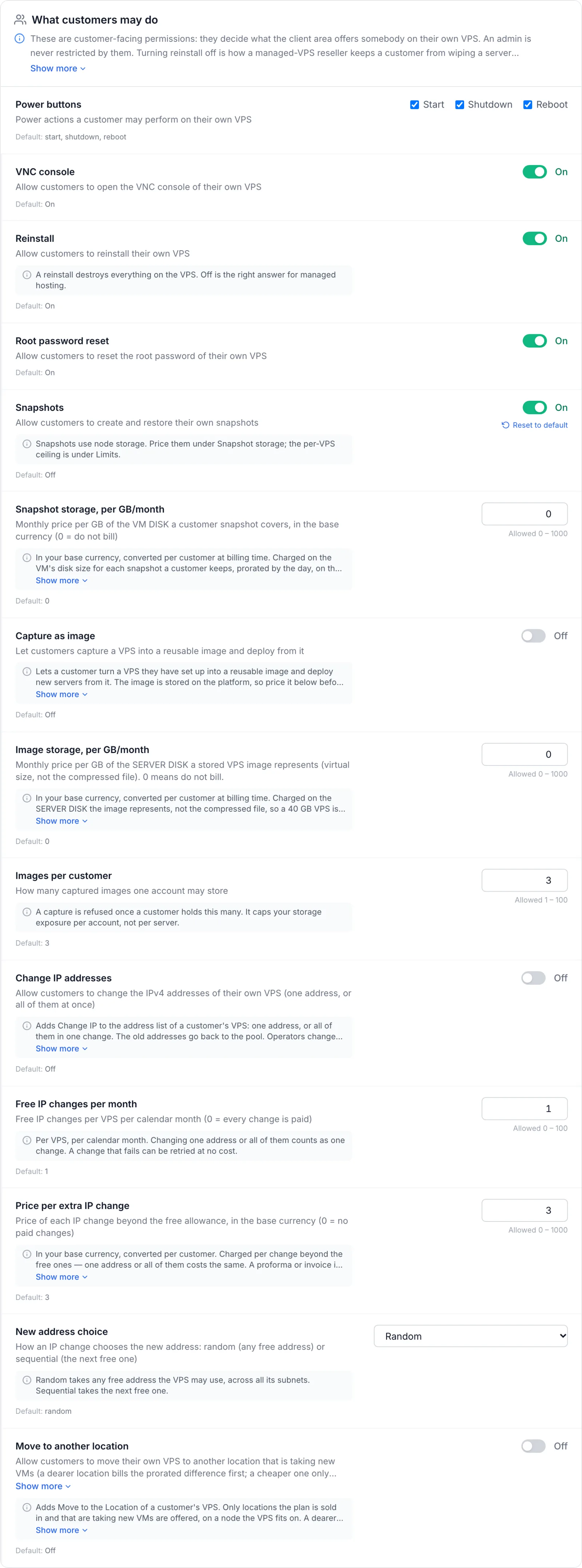
- VPS settings. For native VPS, VPS → Settings has a What customers may do group that applies to every VPS, including Power buttons, VNC console, Reinstall, Root password reset and Capture as image. The product switch and the VPS setting must both be on. For example, Server images on a product does nothing until Capture as image is switched on in VPS settings. See VPS Settings.
- Service status. A suspended or terminated VPS refuses console, reinstall and password reset, and a suspended, cancelled or terminated dedicated server refuses power, reinstall and password reset, whatever the product allows.
- Team permissions. A team member of the customer's account also needs the matching permission, such as Power Controls or Console Access. See Team Members.
- The machine itself. A switch cannot add an action the server does not support. A dedicated server's console, for example, still needs a reachable management interface, and a plugin product's console needs a plugin that can open one.
What the customer sees
The client panel draws only the controls the customer may use. On a native VPS service page:
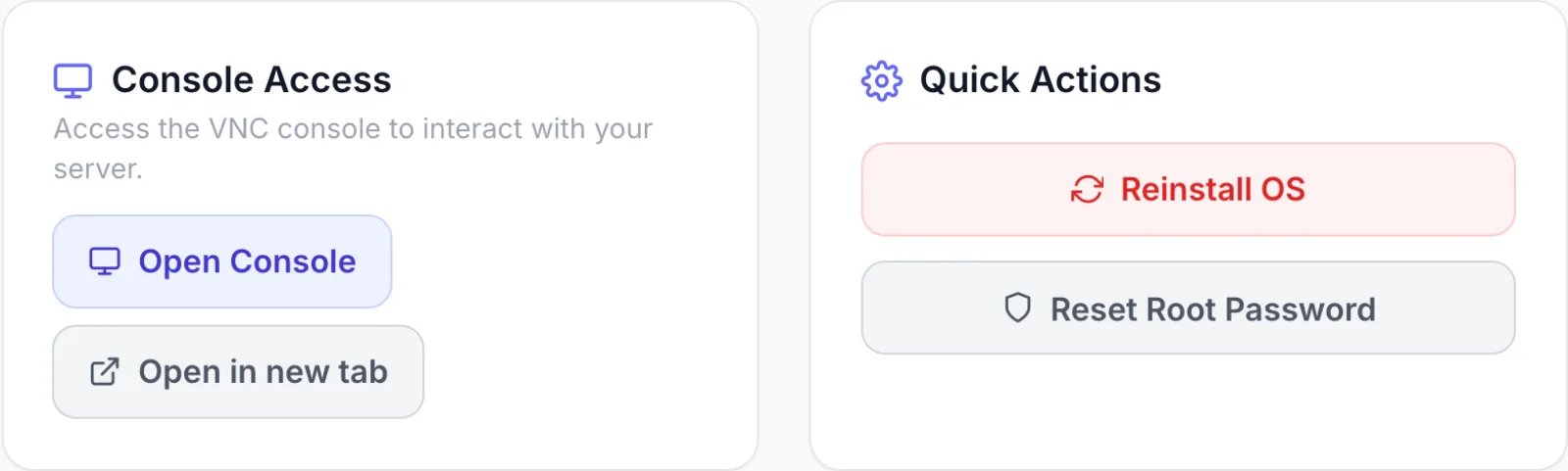
- With Console off, the Console Access card with its Open Console button is not shown.
- With Power control off, the power buttons at the top of the page, such as Restart and Stop, are not shown.
- With Reinstall and Password reset both off, the Quick Actions card with Reinstall OS and Reset Root Password is not shown at all. With one of them off, only its button goes.
- With Server images off, the Server images card with Capture this server is not shown.
Dedicated servers work the same way: buttons for actions the product does not allow are not drawn.
API, resellers and share links
The switches are enforced on the server, not only in the panel, so they hold on every route a customer can take:
- REST API. A service's list of available actions leaves out what the product does not allow, and a call for a switched-off action is refused. See REST API.
- Resellers. A partner reselling the product through the reseller API or the reseller portal gets the same limits as a direct customer. See Reseller API.
- Console share links. A share link cannot be created for a service whose product has Console off.
On a dedicated server, Password reset matters mainly for the API and the reseller routes, which can reset the root password of a dedicated server.
Troubleshooting
These are the messages a customer or an API client gets when a product switch blocks an action.
| Message | Cause and fix |
|---|---|
Console access is disabled for this product | Console is off on the product. Switch it on if the customer should have the console. |
Power actions are not available on this VPS | Power control is off on the product, or no power action is allowed under Power buttons in VPS settings. |
Power actions are not available on this server | Dedicated server: Power control is off on the product. |
Reinstall is not available on this VPS | Reinstall is off on the product or in VPS settings. |
Reinstall is not available on this server | Dedicated server: Reinstall is off on the product. |
Password reset is not available on this VPS | Password reset is off on the product, or Root password reset is off in VPS settings. |
Password reset is not available on this server | Dedicated server: Password reset is off on the product. |
"Product name" does not offer server images. | Server images is off on the product. The message names the product. |
A switch is on but the customer still has no button
- For a VPS, check the What customers may do group in VPS → Settings. Both layers must allow the action.
- Check the service status. Suspended and terminated services refuse most of these actions.
- If the customer is a team member, check their team permissions.
I do not see the Client controls card
The product's kind reads none of the switches: it is a game server, web hosting, other, colocation, IP transit or licence product, or it is provisioned by a plugin that cannot open a console. There is nothing to set for these products.
Related articles
- Products: the rest of the product editor.
- VPS Settings: the module-wide customer actions for VPS.
- Server Images: how customers capture and deploy images.
- Managing Your Services: the customer's side of the service page.