
Node Error Handling and Retry
Retry a failing flow node, then stop, continue or take an error output. How failures are detected and how node, connection and flow retries combine.
Any node in a flow can fail. A provider times out, an expression hits a missing value, or a sub-flow returns an error. Every node except Start and End has its own Error handling & retry settings. Use them to retry the node a few times before giving up, and to decide what happens when it still fails: stop the run, carry on as if nothing happened, or take a separate error path.
This article is for people who build or maintain plugin flows. It covers each option, how a failure is detected, how node retries combine with connection and whole-flow retries, and how to read the results in the Test pane. For the canvas itself see Building Flows; for each node's own fields see the Node Reference.
Where to find it
- Open Settings → Integrations → Plugins and open the plugin. Plugins need no feature toggle.
- On the Flows tab, open the flow in the builder.
- Click a node on the canvas. Its settings panel opens on the right.
- At the bottom of the panel, below the node's own fields, click Error handling & retry to expand it.
- Change the settings, then click Save in the builder header. Node settings are stored with the flow, so nothing changes until you save.
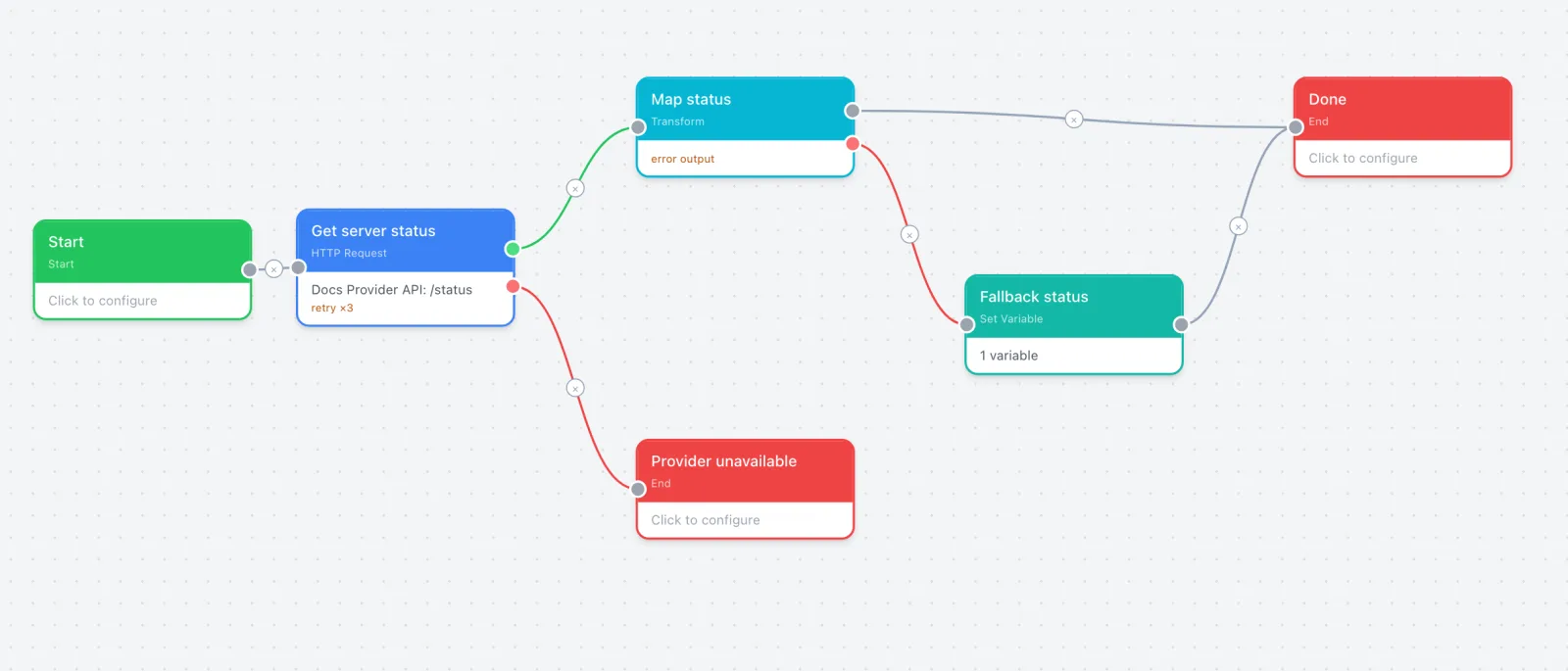
The section is collapsed on a node that has neither option turned on. Once a node retries or does anything other than stop, the header shows an amber on marker, the section opens by itself, and the node card on the canvas gets an amber summary line, such as retry ×3 · continue on error.
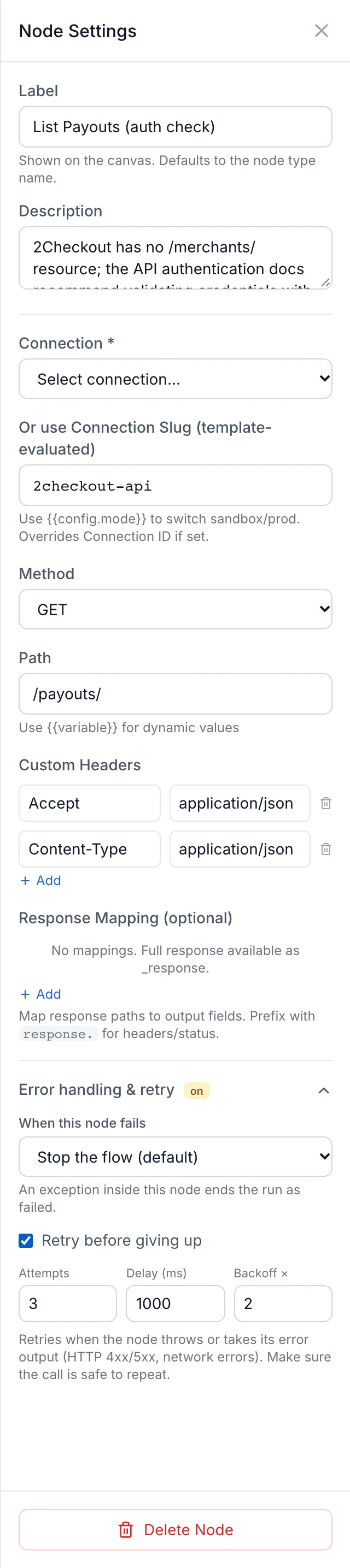
The settings
| Field | Values | What it does |
|---|---|---|
| When this node fails | Stop the flow (default), Continue on the normal path, Take the error output | What the run does once the node has failed and any retries are used up. See the next section. |
| Retry before giving up | Checkbox | Runs the node again before treating it as failed. Ticking it fills in 3 attempts, a 1000 ms delay and a backoff of 2. |
| Attempts | 2–10 | Total runs of the node, including the first one. 3 means one try and up to two retries. |
| Delay (ms) | 0–60000 | The wait before the first retry. 0 retries at once. |
| Backoff × | 1–4, in steps of 0.5 | Multiplies the delay before each later retry. 1 keeps the delay constant; 2 doubles it each time. |
Values outside a range are pulled back to the nearest limit as you type.
When this node fails
Stop the flow (default)
The run ends at this node and counts as failed. The node's error message becomes the run's error. This is how every node behaves until you change it.
Continue on the normal path
The run carries on to the next node as if this one had worked. The next node receives this node's input plus two extra fields: error, which holds the error message, and failed: true. On a node with a Success output, wire Success so the run has a clear path to follow.
Use this for steps that are nice to have, such as an optional log call or a lookup that only adds detail. A later Condition can test failed if you want to react to it. A run that ends after a continued error counts as completed unless your End node says otherwise. See How a run is judged.
Take the error output
The run leaves the node through its red Error output. The next node receives the node's input plus error (the message), failed: true and _error: true.
Nodes that normally have one output (Transform, Status Map, Set Variable, Delay, Log and Format Message) get a second, red connector when you choose this option. Wire it to the node that should handle the failure. If you leave it unwired, the run continues down the normal output with the error fields attached, and ends as failed unless a later node clears them.
HTTP Request, Crypto, XML Parse, Code and Call Flow already have Success and Error outputs, so this option sends unexpected errors down the same red output their ordinary failures use.
Condition, Switch and Loop do not offer this option. They can stop or continue only.
What counts as a failure
A node can fail in two ways, and the settings treat them differently.
- The node takes its own Error output. HTTP Request, Crypto, XML Parse, Code and Call Flow report most problems this way. HTTP Request does it for any response that is not a 2xx and for network errors; Code does it when the script throws; Call Flow does it when the sub-flow fails or no flow is selected. This is a normal result, not an exception.
- The node raises an error it cannot handle. Examples include a Transform node whose expression fails under the v2 expression language (see v2 Expressions), and an HTTP Request node with no connection set (
No connection configured for HTTP request).
| Setting | Node raises an error | Node takes its Error output |
|---|---|---|
| Retry before giving up | Retries | Retries (HTTP Request, Crypto, XML Parse, Code, Call Flow) |
| When this node fails | Applies | Does not apply: the run follows the Error output as wired |
In practice, on an HTTP Request or Code node, Continue on the normal path does not stop a 500 response or a failing script from taking the Error output. To carry on after those, wire the Error output to the next step yourself.
An unwired Error output on these five nodes ends the run there, and the run is reported as failed with the node's error message. Building Flows covers branch wiring in general.
Retry before giving up
With retry on, a failed attempt waits and runs the same node again with the same input. The wait before retry n is Delay × Backoff to the power of n−1, and no single wait is longer than 60 seconds.
| Attempt | Wait before it |
|---|---|
| 1 | none |
| 2 | 1 second |
| 3 | 2 seconds |
| 4 | 4 seconds |
The waits count against the flow's Timeout (ms) in Flow Settings. A wait is cut short so that it never runs past that budget. If the node is still running when the budget is used up, the whole run fails with Flow execution timeout after <N>ms. With long delays or many attempts, raise the flow timeout to match.
If an attempt succeeds, the run continues normally and the earlier failures are only visible in the trace. If the last attempt also fails, When this node fails decides what happens next. If the failure was the node taking its Error output, the run takes that output.
Only retry calls that are safe to repeat. On an HTTP Request node, retry also fires on 4xx responses, which usually mean the request itself is wrong and will fail again. A retried request that creates something (an order, a VPS, a charge) can create it twice if the provider did the work but the answer was lost. Retry reads, status checks and calls the provider treats as idempotent.
Three layers of retry
Node retry is one of three places a flow can retry. Each node attempt makes its HTTP call again from the beginning, so the node and whole-flow settings are the ones to tune when a provider is unreliable.
| Layer | Where you set it | What it retries |
|---|---|---|
| Connection | Retry Count on the plugin's connection (see Connections & Authentication) | The single HTTP call, inside one node attempt. A response with an error status is never retried here. |
| Node | Retry before giving up on the node | That node, on a raised error or when it takes its Error output. |
| Whole flow | Retry the whole flow on failure (exponential backoff) and Max Retries in Flow Settings | The entire run from Start, with the original input and variables reset. Waits start at about 1 second and double each time, capped at about 30 seconds. |
Whole-flow retry starts only when a run stops with an error: a node set to stop fails, or the run times out. A run that ends normally but is marked as failed, for example through an unwired Error output or an End node that returns success: false, is not retried. Prefer node retry on the one call that is flaky; it is faster and does not repeat the steps that already worked.
How a run is judged
When the run reaches an End node, it is reported as Completed or Failed:
- If the End node's output contains a
successfield, that value decides it. - Otherwise the run fails if the data reaching the End node still carries
_error: true(from an Error output or Take the error output), and completes if it does not.
This means a failure path wired to an End node that simply passes its input through is still reported as Failed, with the original error message, and that is usually what you want. To finish the run successfully after handling an error, have the End node return success: true or set its own output. Continue on the normal path adds failed: true but not _error, so a continued run completes unless you decide otherwise.
Checking it in the Test pane
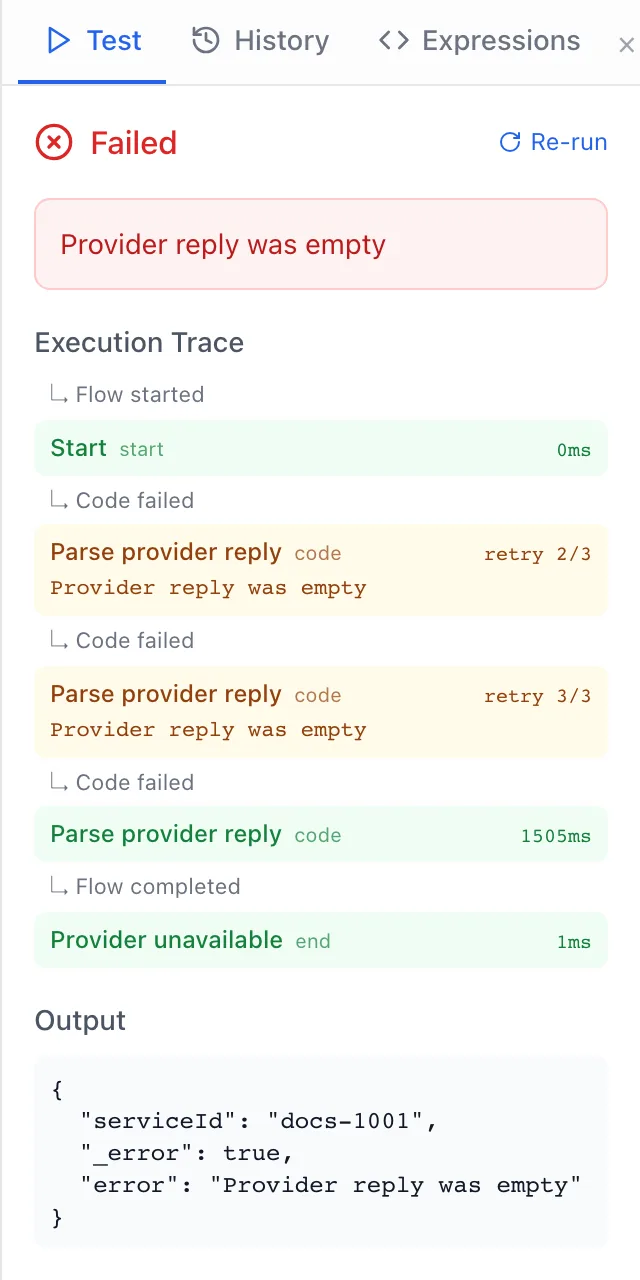
Click Test in the builder header, enter sample input and run the flow. The result shows Completed or Failed, the error if there was one, the Execution Trace and the Output. Error handling adds its own rows to the trace, in amber:
| Row label | Meaning |
|---|---|
retry 2/3 | The node failed and is being tried again: this is attempt 2 of 3. The line under it shows why the previous attempt failed. |
error_ignored | The node failed and Continue on the normal path carried the run on. The message is shown under it. |
error_branch | The node failed and Take the error output sent the run down the red output. |
error (red) | The node failed and stopped the run. |
attempt_failed (red) | A whole-flow attempt ended in an error. With whole-flow retry on, a retry row for the next attempt follows. |
Click a node's row to select that node on the canvas. Runs are also recorded under History, which only super admins can open.
Common patterns
Optional step that must never block the flow
A notification or logging call after the real work: set When this node fails to Continue on the normal path for raised errors. If it is an HTTP Request node, also wire its Error output to the same next node, because a failed response uses that output.
Flaky provider status call
On the HTTP Request node, tick Retry before giving up with 3–4 attempts and a 1000–2000 ms delay. Wire the Error output to an End node that returns a clear message, so the panel shows something useful when the provider is really down.
Fallback value instead of a failure
For a Transform or Set Variable node whose expression can fail on unusual input, choose Take the error output and wire the red output to a Set Variable node that supplies a safe default. Then join it back to the main path.
Limits and behaviour to know
- Start and End nodes have no error handling settings.
- A retried node runs again with exactly the input it received the first time. Unlike whole-flow retry, nothing earlier in the run is repeated or reset.
- Retry waits never exceed 60 seconds each and never run past the flow's timeout.
- Retries and continued errors do not lift the flow's own safety limits. A run that executes more than 1000 nodes stops with
Flow exceeded 1000 node executions (possible cycle), and a flow that calls sub-flows shares one node budget with them. - Error handling settings are part of the flow, so they are exported and imported with the plugin. See Packaging, Importing & Updating.
Troubleshooting
| What you see | Cause and fix |
|---|---|
| The node is set to Continue on the normal path, but the run still goes down the Error output or stops | The node reported the failure through its own Error output (an HTTP error status, a Code script that threw, a failed sub-flow). Continue only covers raised errors. Wire the Error output where you want the run to go. |
Flow execution timeout after <N>ms | Retry waits plus the node's own run time used up the flow budget. Lower Attempts or Delay (ms), or raise Timeout (ms) in Flow Settings. |
| The run is Failed although the error path ran to an End node | The data reaching the End node still carries the error marker. Return success: true from the End node if the handled path should count as a success. |
Flow completed with failure | The run ended with the error marker but no error text. Give the failure End node an output with a readable error message. |
No connection configured for HTTP request | The HTTP Request node has no connection selected, or its connection slug expression resolved to a name the plugin does not have. This is a raised error, so When this node fails applies to it. Retrying will not help; select the connection. |
| The whole-flow retry never fires | The run did not stop with an error; it ended through an Error output or a success: false End node. Use node retry on the failing node instead. |
| A provider created two resources for one order | A create call was retried after the provider had already done the work. Turn retry off on that node, or check for an existing resource before creating one. |